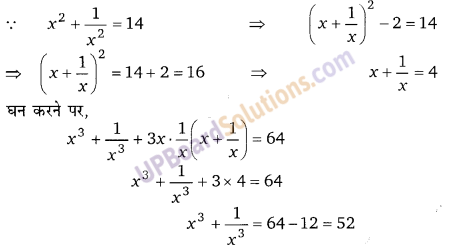
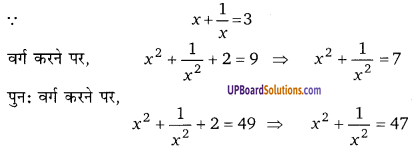
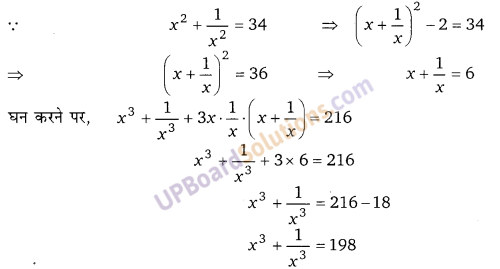
Balaji Class 9 Maths Solutions Chapter 5 Polynomial and their Factors Ex 5.7

Balaji Class 9 Maths Solutions Chapter 5 Polynomial and their Factors Ex 5.7 बहुपद तथा उनके गुणनखण्ड

प्रश्न 1.
निम्न व्यंजकों के गुणनखण्ड ज्ञात कीजिए
(i) x3 – 8y3
(ii) a3 – 0.216
(iii) 16a4 + 54a
(iv) a6 – 7a3 – 8
हलः
(i) x3 – 8y3 = (x)3 – (2y)3 = (x – 2y)(x2 + 4y2 + 2xy)

(ii) a3 – 0.216 = (a)3 – (0.6)3 = (a – 0.6)(a2 – 0.36 + 0.6 a)

(iii) 16a4 + 54a = 2a(8a3 + 27) = 2a[(2a)3 + (3)3] = 2a[(2a + 3)(4a2 + 9 – 6a)]

(iv) a6 – 7a3 – 8 = a – (8 – 1)a3 – 8 = a6 – 8a3 + a3 – 8 = a (a3 – 8) – 1(a3 – 8)
= (a3 – 8)(a3 + 1) = [(a)3 – (2)3][(a)3 + (1)3]
= (a – 2)(a2 + 4 + 2a)(a + 1)(a + 1 – a)

Balaji Class 9 Maths Solutions Chapter 5 Polynomial and their Factors Ex 5.7

प्रश्न 2.
निम्न व्यंजकों के गुणनखण्ड ज्ञात कीजिए
(i) x3 + 64
(ii) 1 – 125y3
(iii) [latex]\frac{p^{3}}{343}[/latex] + 8q3
(iv) 7m4n – 7mn4
(v) x7y7 – xy
हलः
(i) x3 + 64 = (x)3 + (4)3 = (x + 4)(x2 + 16 – 4x)

(ii) 1-125y 3 = (1)3 – (5y)3 = (1 – 5y)(1 + 25y2 + 5y)

(iii) [latex]\frac{p^{3}}{343}+8 q^{3}=\left(\frac{p}{7}\right)^{3}+(2 q)^{3}=\left(\frac{p}{7}+2 q\right)\left(\frac{p^{2}}{49}+4 q^{2}-\frac{2}{7} p q\right)[/latex]

(iv) 7m4n – 7mn4 = 7mn(m3 – n3) = 7mn[(m)3– (n)3] = 7mn[(m – n)(m2 + n2 + mn)]

(v) x7y7 – xy = xy(x6y6 – 1) = xy[(x2y2)3 – (1)3].
= y[(x2y2 – 1)(x4y4 + 1 + x2y2]
= xy [(xy)2 – (1)2) (x4y4 – 1 + 2x2y2 xy2)]
= xy (xy + 1)(xy – 1)[(x2y2 + 1)2 – (xy)2]
= xy(xy + 1)(xy – 1)(x2y2 + 1 + xy)(x2y2 + 1 – xy)

प्रश्न 3.
निम्न व्यंजकों के गुणनखण्ड ज्ञात कीजिए
(i) (a + 2b)3 – (a – 2b)3
(ii) a3 + b3 + c(a2 – ab + b2)
(iii) x6 – 7x3 – 8
(iv) x3 – 3x2 + 3x + 7
हल:
(i) (a + 2b)3 – (a – 2b)3 = (a + 2b – a + 2b) [(a + 2b)2 + (a – 2b)2 + (a + 2b) (a – 2b)]
= (4b)[a2 + 4b2 + 4ab + a2 + 4b2 – 4ab + a2 – 4b2]
= (4b)[3a2 + 4b2]

(ii) a3 + b3 + c(a2 – ab + b2) = (a + b)(a + b2 – ab) + c(a2 – ab + b)
= (a2 + b2 – ab)[a + b + c]

(iii) x6 – 7x3 – 8 = x6 – (8 – 1)x3 – 8 (∵ 8 = 1 × 8)
= x6 – 8x3 + x3 – 8 = x3 (x3 – 8) +1(x3 – 8) = (x3 – 8)(x3 + 1)
=[(x)3 – (2)3][(x)3 + (1)3] = (x – 2)(x2 + 4 + 2x)(x + 1)(x2 + 1 – x)

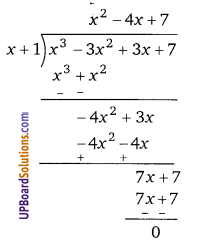
(iv) x3 – 3x2 + 3x + 7
माना f(x) = x3 – 3x2 + 3x + 7
x + 1 = 0
x = -1 रखने पर,
= (-1)3 – 3(-1)2 + 3 × (-1) +7
= -1 – 3 – 3 + 7 = -7 + 7 = 0
∵ (x + 1), f(x) का एक गुणनखण्ड है।
अतः
Balaji Class 9 Maths Solutions Chapter 5 Polynomial and their Factors Ex 5.7
अत: x3 – 3x2 + 3x + 7 के गुणनखण्ड (x + 1)(x2 – 4x + 7) है।

Balaji Class 9 Maths Solutions Chapter 5 Polynomial and their Factors Ex 5.7

प्रश्न 4.
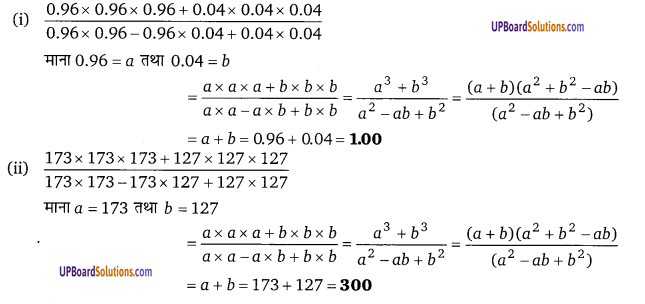
निम्न व्यंजकों को सरल करके उनके मान ज्ञात कीजिए
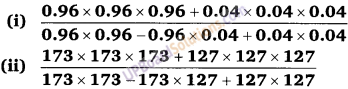
Balaji Class 9 Maths Solutions Chapter 5 Polynomial and their Factors Ex 5.7
हलः
Balaji Class 9 Maths Solutions Chapter 5 Polynomial and their Factors Ex 5.7

Ex 5.7 Polynomial and their Factors स्वमूल्यांकन परीक्षण (Self Assessment Test)

निम्न के गुणनखण्ड कीजिए।
प्रश्न 1.
[latex]27 p^{3}-\frac{1}{216}-\frac{9}{2} p^{2}+\frac{1}{4} p[/latex] (NCERT)
हलः
[latex](3 p)^{3}+\left(-\frac{1}{6}\right)^{3}+3(3 p)\left(-\frac{1}{6}\right)\left(3 p-\frac{1}{6}\right)=\left(3 p-\frac{1}{6}\right)^{3}[/latex]

प्रश्न 2.
49a2 + 70ab + 25b2
हलः
(7a)2 + 2 × 7a × 5b + (5b)2
सूत्र [x2 + 2xy + y2 = (x + y)] से
= (7a + 5b)2

प्रश्न 3.
4x2 + y2 + z2 – 4xy -2yz + 4xz
हलः
(2x)2 + (-y)2 + (z)2 + 2. (2x)(-y) + 2(-y) (z) + 2. (2x)(z)
= (2x – y + z)2 = (2x – y + z)(2x – y + z)

Balaji Class 9 Maths Solutions Chapter 5 Polynomial and their Factors Ex 5.7

प्रश्न 4.
64m3 – 343n3
हलः
64m3 – 343n3 = (4m)3 – (7n)3 = (4m – 7n)(16m2 + 49n2 + 28mn)

प्रश्न 5.
27 – 125a3 – 135a + 225a2    (NCERT)
हलः
27 – 125a3 – 135a + 225a2
= (3)3 – (5a) – 45a(3 – 5a) = (3 – 5a)(9 + 25a2 + 15a) – 45a(3 – 5a)
= (3 – 5a)(9 + 25a2 + 15a – 45a) = (3 – 5a)(9 + 25a2 – 30a)
= (3 – 5a)[(3)2 + (5a)2 – 2 × 3 × 5a]
= (3 – 5a) (3 – 5a)2 = (3 – 5a)3

प्रश्न 6.
8a3 – b3 – 12a2b + 6ab2      (NCERT)
हल:
8a33 – b3 – 12a2b + 6ab2
= (2a)3 – (b)3 – 6ab (2a – b) = (2a – b)(4a2 + b2 + 2ab) – 6ab(2a – b)
= (2a – b) [4a2 + b2 + 2ab – 6ab] = (2a – b)[4a2 + b2 – 4ab]
= (2a – b)[(2a)2 + (b2) – 2 × 2a × b]
= (2a – b)(2a – b)2 = (2a – b)3

प्रश्न 7.
64a3 – 27b3 – 144a2b + 108ab2
हलः
(4a)3 – (3b)3 – 36ab(4a – 3b)
= (4a – 3b)(16a2 + 9b2 + 12ab) – 36ab(4a – 3b)
= (4a – 3b)(16a2 + 9b2 + 12ab – 36ab) = (4a – 3b)(16a2 + 9b2 – 24ab)
= (4a – 3b)[(4a)2 + (3b)2 – 2 × 4a × 3b]
= (4a – 3b)[4a – 3b]2 = (4a – 3b)3

प्रश्न 8.
8a3 + b3 + 12a2b + 6ab2 (NCERT)
हलः
(2a) + (b)3 + 6ab(2a + b)
= (2a + b)(4a2 + b2 – 2ab) + 6ab(2a + b)
= (2a + b)[4a2 + b2 – 2ab + 6ab]
= (2a + b)[4a2 + b2 + 4ab]
= (2a + b)[(2a)2 + (b)2 + 2 × 2a × b]
= (2a + b)(2a + b)2 = (2a + b)3

Balaji Class 9 Maths Solutions Chapter 5 Polynomial and their Factors Ex 5.7

प्रश्न 9.
[latex]27 p^{3}-\frac{1}{216}-\frac{9}{2} p^{2}+\frac{1}{4} p[/latex]
हलः
[latex](3 p)^{3}+\left(-\frac{1}{6}\right)^{3}+3(3 p)\left(-\frac{1}{6}\right)\left(3 p-\frac{1}{6}\right)=\left(3 p-\frac{1}{6}\right)^{3}[/latex]

प्रश्न 10.
27x3 + y3 + z3 – 9xyz
हलः
(3x)3 + (y)3 + (z)3 – 3(3x)(y)(z)
= (3x + y + z)[(3x)2 + y2 + z2 – 3xy – yz – 3xz]
= (3x + y + z)[9x2 + y2 + z2 – 3xy – yz – 3xz]

प्रश्न 11.
सिद्ध कीजिए कि a2 + b2 + 2(ab + bc + ca) = (a + b)(a + b + 2c)
हलः
L.H.S. = a2 + b2 + 2(ab + bc + ca) = a2 + b2 + 2ab + 2bc + 2ca
= (a + b)2 + 2c(a + b) = (a + b)[a + b + 2c] = R.H.S.

प्रश्न 12.
सिद्ध कीजिए कि 8a3 – b3 – 4ax + 2bx = (2a – b)(4a2 + 2ab + b2 – 2x)
हलः
L.H.S. = 8a3 – b3 – 4ax + 2bx
= (2a)3 – (b)3 – 2x(2a – b) = (2a – b)(4a2 + b2 + 2ab) – 2x(2a – b)
= (2a – b)(4a2 + b2 + 2ab – 2x) = R.H.S.

Balaji Class 9 Maths Solutions Chapter 5 Polynomial and their Factors Ex 5.7

प्रश्न 13.
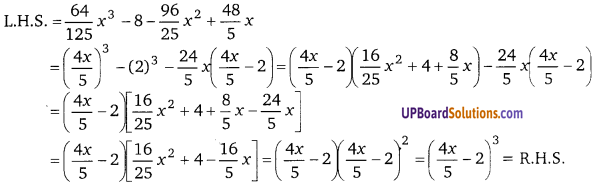
सिद्ध कीजिए कि [latex]\frac{64}{125} x^{3}-8-\frac{96}{25} x^{2}+\frac{48}{5} x=\left(\frac{4 x}{5}-2\right)^{3}[/latex]
हलः
Balaji Class 9 Maths Solutions Chapter 5 Polynomial and their Factors Ex 5.7

प्रश्न 14.
सिद्ध कीजिए कि a3x3 – 3a2bx2 + 3ab2x – b3 = (ax – b)3 हलः
L.H.S. = ax3 – b3 – 3a2bx2 + 3ab2x
= (ax)3 – (b)3 – 3abx(ax – b) = (ax – b)(a2x2 + b2 + abx) – 3abx(ax – b)
= (ax – b)(a2x2 + b2 + abx – 3abx) = (ax – b)(a2x2 + b2 – 2abx)
= (ax – b)(ax – b)2 = (ax – 1)3 = R. H.S.

प्रश्न 15.
सिद्ध कीजिए कि a3 + b3 + 1 + 3ab = (a – b + 1)(a3 + b3 + ab – a + b + 1)
हलः
L.H.S. = (a)3 + (-b)3 + (1)3 – 3(a)(-b)(1)
= (a – b + 1)(a2 + b2 +1+ ab + b-a)
[∵ x3 + y2 + z3 – 3xy2 = (x + y + z)(x2 + y2 + z2 – xy – yz – zx)]
∴ a3 – b3 + 1 + 3ab = (a – b + 1)(a2 + b2 + ab + a + b + 1) = R.H.S.

प्रश्न 16.
यदि p = 2 – a, तब सिद्ध कीजिए कि a3 + 6ap + p3 – 8 = 0
हलः
L.H.S. =a3 + 6ap + p – 8
= a3 – 8 + 6ap + p3 = (a – 2)(a2 + 4 + 2a) + p(6a + p2)
p = 2 – a रखने पर
= (a − 2)(a2 + 4 + 2a) +(2 – a)(6a + 4 + a2 – 4a)
= (a − 2)(a2 + 4 + 2a) – (a − 2)(a2 + 2a + 4)
= (a – 2)[a2 + 4 + 2a – a2 – 2a – 4] = 0 = R. H.S.

Balaji Class 9 Maths Solutions Chapter 5 Polynomial and their Factors Ex 5.7

प्रश्न 17.
यदि x = 2y+6, तब सिद्ध कीजिए कि x3 – 8y3 – 36xy – 216 =0 (NCERT Exemplar) .
हल:
L.H.S. = x3 – 8y3 – 36xy – 216
= (x)3 – (2y)3 – 36xy – 216 = (x – 2y)(x2 +4y2 + 2xy) – 36xy – 216
x = 2y + 6 रखने पर
= [2y + 6 – 2y][(2y + 6)2 + 4y2 + 2(2y + 6)y] – 36(2y + 6)y – 216
= 6[4y2 + 36 + 24y + 4y2 + 4y2 + 12y] – 72y2 – 216y – 216 = 0 = R.H.S.

प्रश्न 18.
यदि x + y = -4, तब सिद्ध कीजिए कि x + y3 – 12xy + 64 = 0 (NCERT Exemplar)
हल:
x3 + y3 – 12xy + 64
= (x + y) (x2 + y2 – xy) – 12xy + 64= (-4)(x2 + y2 – xy) – 12xy + 64
= -4x2 – 4y2 + 4xy – 12xy + 64 = -4x2 – 4y2 – 8xy + 64
= -4x2 – 4(-4 – x)2 – 8x(-4 – x) + 64 [y = -4 – x रखने पर]
= -4x2 – 4(16 + x2 + 8x) + 32x + 8x2 + 64 = 0 = R.H.S.

प्रश्न 19.
यदि a2 + b2 + c2 = 250 और ab+ bc + ca = 3, तब सिद्ध कीजिए कि a + b+ c = ±16
हलः
सूत्र (a + b + c) = a2 + b2 + c2 + 2(ab + bc + ca) .
(a + b + c)2 = 250 + 2 × 3 = 250 + 6 = 256
(a + b + c) = [latex]\sqrt{256}[/latex] = ± 16

प्रश्न 20.
सिद्ध कीजिए कि

Balaji Class 9 Maths Solutions Chapter 5 Polynomial and their Factors Ex 5.7
हलः
माना a = 0.013 तथा b = 0.007
Balaji Class 9 Maths Solutions Chapter 5 Polynomial and their Factors Ex 5.7 Q6
= a + b = 0.013 + 0.007 = 0.020

Balaji Class 9 Maths Solutions Chapter 5 Polynomial and their Factors Ex 5.7

प्रश्न 21.
यदि a + b ≠ 0 तब सिद्ध कीजिए कि समीकरण a(x – a) = 2ab – b(x – b) का हल x = a + b होता है|
हलः
∵ a(x – a) = 2ab – b(x – b)
⇒ ax – a2 – 2ab + bx – b2 = 0
x(a + b) = a2 + b2 + 2ab
x(a + b) – (a + b)2 = 0
(a + b){x – (a + b)} = 0
a + b ≠ 0 अत: x – (a + b) = 0
x = (a + b)

प्रश्न 22.
सिद्ध कीजिए कि 2(a2 + b2) = (a + b)2 तब a = b
हलः
∵ 2(a + b2) = (a + b)2
⇒ 2(a2 + b2) = a2 + b2 + 2ab
⇒ 2a2 + 2b2 = a2 + b2 + 2ab
⇒ a2 + b2 – 2ab = 0
⇒ (a – b)2 = 0 ⇒ a = b

Balaji Class 9 Maths Solutions Chapter 5 Polynomial and their Factors Ex 5.7

प्रश्न 23.
सिद्ध कीजिए कि 1 – x2 + 2xy – y2 = (1 + x – y)(1 – x + y)
हलः
L.H.S. = 1 – x2 + 2xy – y2
= 1 – (x2 – 2xy + y2) = 12 – (x – y)2
= (1 + x – y)(1 – x + y) = R.H.S.

प्रश्न 24.

Balaji Class 9 Maths Solutions Chapter 5 Polynomial and their Factors Ex 5.7
हलः
Balaji Class 9 Maths Solutions Chapter 5 Polynomial and their Factors Ex 5.7

प्रश्न 25.
Balaji Class 9 Maths Solutions Chapter 5 Polynomial and their Factors Ex 5.7
हलः
Balaji Class 9 Maths Solutions Chapter 5 Polynomial and their Factors Ex 5.7

प्रश्न 26.
Balaji Class 9 Maths Solutions Chapter 5 Polynomial and their Factors Ex 5.7
हलः
Balaji Class 9 Maths Solutions Chapter 5 Polynomial and their Factors Ex 5.7

Balaji Publications Mathematics Class 9 Solutions

Balaji Class 10 Maths Solutions Chapter 11 Height and Distance Ex 11.1

Balaji Class 10 Maths Solutions Chapter 11 Height and Distance Ex 11.1 ऊँचाई एवं दूरी

Ex 11.1 Height and Distance बहुविकल्पीय प्रश्न (Multiple Choice Questions)

सही विकल्प का चयन कीजिए।

प्रश्न 1.
जिस समय सूर्य का उन्नयन कोण 45° था तो एक मीनार की परछाई, उस मीनार की लम्बाई से-
(a) बराबर है।
(b) अधिक है।
(c) कम है।
(d) इनमें से कोई नहीं
हल:
∵ मीनार की ऊँचाई = AB, (UPBoardSolutions.com) मीनार की छाया = BC
∆ABC में,
Balaji Class 10 Maths Solutions Chapter 11 Height and Distance Ex 11.1 1
∴ मीनार की ऊँचाई = मीनार की छाया अतः विकल्प (a) सही है।

UP Board Solutions

प्रश्न 2.
किसी स्तम्भ की ऊँचाई उसकी छाया से [latex] \sqrt{{3}} [/latex] गुणा है। सूर्य के उन्नयन कोण का मान होगा-
(a) 45°
(b) 60°
(c) 30°
(d) इनमें से कोई नहीं
हलः
खम्भे की ऊँचाई AB = [latex] \sqrt{{3}} [/latex] × खम्भे की छाया
AB = [latex] \sqrt{{3}} [/latex] × (UPBoardSolutions.com) BC
∆ABC में,
Balaji Class 10 Maths Solutions Chapter 11 Height and Distance Ex 11.1 2
अतः विकल्प (b) सही है।

प्रश्न 3.
एक मीनार के आधार से 20 मीटर दूर भूमि पर स्थित एक बिन्दु से मीनार की चोटी का उन्नयन कोण 30° है। तब मीनार की ऊँचाई-
(a) 20[latex] \sqrt{{3}} [/latex] मीटर
(b) 20 मीटर
(c) [latex]\frac{20}{3 \sqrt{3}}[/latex] मीटर
(d) इनमें से कोई नहीं
हलः
Balaji Class 10 Maths Solutions Chapter 11 Height and Distance Ex 11.1 3

UP Board Solutions

प्रश्न 4.
यदि सूर्य का उन्नयन कोण 45° है। तब h मीटर के स्तम्भ की परछाई होगी-
(a) [latex]\frac{h}{2}[/latex] मीटर
(b) [latex]\frac{h}{3}[/latex] मीटर
(c) h मीटर
(d) इनमें से कोई नहीं
हलः
मीनार की ऊँचाई, (UPBoardSolutions.com) AB = h मी
Balaji Class 10 Maths Solutions Chapter 11 Height and Distance Ex 11.1 4
अतः विकल्प (c) सही है।

प्रश्न 5.
एक पेड़ सतह पर ऊर्ध्वाधर खडा है। पेड से 10[latex] \sqrt{{3}} [/latex] मीटर दूर सतह पर किसी बिन्दु से पेड़ की ऊपरी चोटी का उन्नयन कोण 60° है। तब पेड़ की ऊँचाई होगी-
(a) 30 मीटर
(b) 60 मीटर
(c) 10 मीटर
(d) इनमें से कोई नहीं
हलः
माना पेड की ऊँचाई (UPBoardSolutions.com) = h मीटर
∆ABC में,
Balaji Class 10 Maths Solutions Chapter 11 Height and Distance Ex 11.1 5

UP Board Solutions

प्रश्न 6.
किसी समय एक स्तम्भ की परछाई उसकी लम्बाई के बराबर है तब सूर्य का उन्नयन कोण होगा-
(a) [latex]\frac{\pi}{4}[/latex]
(b) [latex]\frac{\pi}{3}[/latex]
(c) [latex]\frac{\pi}{6}[/latex]
(d) इनमें से कोई नहीं
हलः
माना सूर्य का उन्नयन कोण = θ
∵ दिया है, AB = AC …(1)
∆ABC में,
Balaji Class 10 Maths Solutions Chapter 11 Height and Distance Ex 11.1 6
Balaji Class 10 Maths Solutions Chapter 11 Height and Distance Ex 11.1 6a
अतः विकल्प (a) सही है।

Ex 11.1 Height and Distance लघु उत्तरीय प्रश्न (Short Answer Type Questions)

प्रश्न 7.
किसी स्तम्भ की छाया उसकी ऊँचाई से [latex] \sqrt{{3}} [/latex] गुनी है। सूर्य के उन्नयन कोण का मान ज्ञात कीजिए।
हलः
माना खम्भे की ऊँचाई AB = h मीटर
∴ खम्भे की छाया BC = [latex] \sqrt{{3}} [/latex] × h = [latex] \sqrt{{3}} [/latex]h
मीटर माना खम्भे का उन्नयन कोण = θ
Balaji Class 10 Maths Solutions Chapter 11 Height and Distance Ex 11.1 7
Balaji Class 10 Maths Solutions Chapter 11 Height and Distance Ex 11.1 8

UP Board Solutions

प्रश्न 8.
एक बिजली के खम्भे से 10 मीटर दूर स्थित बिन्दु से बल्ब का उन्नयन कोण 60° है। बल्ब की ऊँचाई ज्ञात कीजिए।
हलः
माना खम्भे पर लगे बल्ब की ऊँचाई AB = h
∆ABC में,
Balaji Class 10 Maths Solutions Chapter 11 Height and Distance Ex 11.1 9
Balaji Class 10 Maths Solutions Chapter 11 Height and Distance Ex 11.1 10

प्रश्न 9.
एक 30 मीटर ऊँचे स्तम्भ से जहाज का अवनमन कोण 30° है। जहाज से स्तम्भ की दूरी ज्ञात कीजिए।
हलः
माना स्तम्भ की ऊँचाई = 30 मीटर
स्तम्भ के शीर्ष से जहाज का (UPBoardSolutions.com) अवनमन कोण = उन्नयन कोण = 30°
Balaji Class 10 Maths Solutions Chapter 11 Height and Distance Ex 11.1 11
Balaji Class 10 Maths Solutions Chapter 11 Height and Distance Ex 11.1 12

UP Board Solutions

प्रश्न 10.
एक बिजली का खम्भा 10 मीटर ऊँचा है। खम्भे को सीधा लम्बवत् रखने के लिए एक तार का सिरा, खम्भे की चोटी से बँधा है तथा दूसरा सिरा भूमि पर स्थिर किया गया है। यदि तार खम्भे के आधार बिन्दु से होकर जाने वाले क्षैतिज के साथ 45° का कोण बनाये तो तार की लम्बाई ज्ञात कीजिए। (NCERT)
हलः
खम्भे की ऊँचाई. AB = 10 मी
∠ACB = 45°
Balaji Class 10 Maths Solutions Chapter 11 Height and Distance Ex 11.1 13
Balaji Class 10 Maths Solutions Chapter 11 Height and Distance Ex 11.1 14

Ex 11.1 Height and Distance दीर्घ उत्तरीय प्रश्न (Long Answer Type Questions)

प्रश्न 11.
एक निरीक्षक AC रेखा के सापेक्ष चलता है जहाँ AC ⊥ AB, AC = 200 मीटर, ∠ ACB = 45%, तब नदी के विपरीत कोनों पर स्थित बिन्दु A व B के बीच की दूरी ज्ञात कीजिए।
हलः
∵ AC ⊥ AB, (UPBoardSolutions.com)
∠ACB = 45°
Balaji Class 10 Maths Solutions Chapter 11 Height and Distance Ex 11.1 15
Balaji Class 10 Maths Solutions Chapter 11 Height and Distance Ex 11.1 16

UP Board Solutions

प्रश्न 12.
किसी वृक्ष जिसकी ऊँचाई 15 मीटर है, का ऊपरी भाग जो आँधी से टूटकर पृथ्वी पर जा लगा है, पृथ्वी से 60° का कोण बनाता है। पृथ्वी से कितनी ऊँचाई पर वृक्ष टूटा है?
हल:
पेड की ऊँचाई, BP = 15 मी
∴ BD = 15, यदि पेड बिन्दु (UPBoardSolutions.com) C से टूटकर जमीन पर बिन्दु A पर लग जाता है।
∵ DC = CA = 15 – x
माना BC = x मीटर
Balaji Class 10 Maths Solutions Chapter 11 Height and Distance Ex 11.1 17
∴ इसलिए पेड पृथ्वी से 6.96 मीटर ऊँचाई से टूटेगा।

UP Board Solutions

प्रश्न 13.
एक सीढ़ी एक ऊर्ध्वाधर दीवार पर इस प्रकार रखी जाती है कि यह दीवार की चोटी तक पहुँचती है। सीढ़ी का पाद दीवार से 1.5 मीटर दूर है और सीढ़ी जमीन से 60° के कोण पर झुकी है। दीवार की ऊँचाई ज्ञात कीजिए। (NCERT)
हलः
माना दीवार की (UPBoardSolutions.com) ऊँचाई = h मीटर
Balaji Class 10 Maths Solutions Chapter 11 Height and Distance Ex 11.1 18
∴ दीवार की ऊँचाई = 2.598 मीटर

प्रश्न 14.
एक स्तम्भ से 20 मीटर दूरी पर स्थित बिन्दु का स्तम्भ के शीर्ष बिन्दु से उन्नयन कोण 30° है। स्तम्भ की ऊँचाई ज्ञात कीजिए। (NCERT)
हलः
माना मीनार की ऊँचाई AB = h मीटर, BC = 20 मीटर
∆ABC में,
Balaji Class 10 Maths Solutions Chapter 11 Height and Distance Ex 11.1 19

प्रश्न 15.
एक गुब्बारा 215 मीटर लम्बे तार से बँधा है तथा क्षैतिज से 60° का कोण बनाता है। गुब्बारे की जमीन से ऊँचाई ज्ञात कीजिए यदि यह माने कि डोरी में कोई ढील नहीं है। (NCERT)
हलः
माना जमीन से गुब्बारा h मीटर की ऊंचाई पर उड रहा है।
∴ AB = h मीटर, AC = 215 मीटर
∆ABC में,
Balaji Class 10 Maths Solutions Chapter 11 Height and Distance Ex 11.1 20
Balaji Class 10 Maths Solutions Chapter 11 Height and Distance Ex 11.1 21

UP Board Solutions

प्रश्न 16.
1.5 मीटर लम्बा एक निरीक्षक 30 मीटर ऊँची मीनार से 28 मीटर दूर खड़ा है, उसकी आँख से मीनार के शीर्ष बिन्दु का उन्नयन कोण ज्ञात कीजिए। (NCERT)
हलः
माना प्रेक्षक की आँख D पर 30 मीटर ऊँची एक मीनार का शीर्ष θ कोण बनाती है।
प्रेक्षक से मीनार की दूरी (UPBoardSolutions.com) CB = 28 मीटर
Balaji Class 10 Maths Solutions Chapter 11 Height and Distance Ex 11.1 22
∴ AB = 30 मीटर,
DC = 1.5 मीटर
∴ AM = AB – DC
= 30 – 1.5
= 28.5 मीटर
∆ADM में,
tanθ = [latex]\frac{A M}{D M}=\frac{28.5}{28}[/latex] ≅ 1 (लगभग) (∵ CB = DM)
∴ θ = 45°

प्रश्न 17.
एक पहाड़ की चोटी से टॉवर के पाद का उन्नयन कोण 60° है तथा टॉवर के शीर्ष से पहाड़ की पाद पर उन्नयन कोण 30° है। यदि टॉवर की ऊँचाई 50 मीटर है तो पहाड़ की ऊँचाई ज्ञात कीजिए। (NCERT)
हलः
माना पहाड़ व टॉवर के बीच (UPBoardSolutions.com) की दूरी + x मीटर
Balaji Class 10 Maths Solutions Chapter 11 Height and Distance Ex 11.1 23

प्रश्न 18.
दो खम्भों के बीच की क्षैतिज दूरी 140 मीटर है। पहले खम्भे के शीर्ष से दूसरे खम्भे के शीर्ष पर अवनमन कोण 30° है। यदि दूसरे खम्भे की ऊँचाई 60 मीटर है तो पहले खम्भे की ऊँचाई ज्ञात कीजिए। (NCERT)
हल:
∵ NQ = MT = 140 मीटर
दूसरी मीनार की ऊँचाई
TQ = MN = 60 मीटर
Balaji Class 10 Maths Solutions Chapter 11 Height and Distance Ex 11.1 24
Balaji Class 10 Maths Solutions Chapter 11 Height and Distance Ex 11.1 25

UP Board Solutions

प्रश्न 19.
50 मीटर ऊँचे एक स्तम्भ से एक खम्भे के शीर्ष व पाद पर अवनमन कोण क्रमशः 45° व 60° हैं। यदि खम्भा एवं स्तम्भ एक ही तल पर स्थित हैं। तो खम्भे की ऊँचाई ज्ञात कीजिए।
हल:
माना खम्भे की ऊँचाई (UPBoardSolutions.com) PQ = h मीटर
Balaji Class 10 Maths Solutions Chapter 11 Height and Distance Ex 11.1 26

Balaji Publications Mathematics Class 10 Solutions

UP Board Solutions for Class 10 Computer Science Chapter 7 Introduction to ‘C’

UP Board Solutions for Class 10 Computer Science Chapter 7 Introduction to ‘C’

Introduction to ‘C’ Long Answer Type Questions (8 Marks)

Question 1.
Explain the structure of a ‘C’ program with example. (UP 2019)
Answer:
Structure of ‘C’ Program:
Before understanding the structure of a ‘C’ program you must know these important points:

  • ‘C’ is a case sensitive language, it means all the keywords must be written in lower case.
  • Key-words can’t be used as a variable or function name.
  • Every instruction should end with (;) sign.
  • Preprocessor directives (required) should (UPBoardSolutions.com) be there in the beginning.
  • Function main () is must for a program.

UP Board Solutions

Now to write a program in ‘C’ we need to follow these steps:
Define preprocessor directives (include header files according to prototype functions, standard I/O library functions to be used).

  • Open function main ()
  • Assign data types and variables.
  • Define the body of the function
  • End the function main ()

Example

/* harsh.c : first example for students */
# include
void main ()
{
int a = 10, b = 15, c;
printf (“Hellow students \n”);
c = a + b ;
printf (“The sum of % d and % d is % d”, a, b, c);
}

UP Board Solutions

In the above example the first line
/*harsh.c: first example for students */
is a comment and non-executable. Comments in ‘C’ begins with (/*) and ends with (*/).

Second-line
#include
is a preprocessor directive. The preprocessor processes the ‘C’ program before the compiler. Here stdio.h is a header file consists of standard I/O functions. A header file related to the functions used (UPBoardSolutions.com) in program should be included at the beginning.
The line
void main()
indicates “the beginning of the program”. The compilation of the program starts from main () function.
{, the symbol indicates the beginning of the main () function

The line
int a = 10, b = 15, C;
is for declaration of variables and data types.

Lines
printf (“Hellow students \n”);
C = a + b.
printf (“The sum of % d and % d is % d”, a, b, c);
are the body of the program.
and symbol ‘}’ indicates end of main ( ) function.

UP Board Solutions

Question 2.
What is looping? Write about the different statements used to erect loop in ‘C’?
Answer:
Looping
Looping Statements: A computer program is a set of statements, which is normally executed sequentially. But in most of the cases, it is necessary to repeat certain steps to meet a specific condition. This repetitive operation is done through a loop control structure.
A loop is basically the execution of the sequence of statements repeatedly until a particular condition is true or false. In ‘C’ language following looping statements are used:

while Statements:
The while loop repeats a statement or a set of statements until a certain condition is true.
Syntax

while (condition)
{
statements
}

Here, the condition may be any expression having a non-zero value. The loop continues until the condition is true. When the condition fails, the program body attached with loop (statements), will not be executed.

Example: To print the first 20 natural numbers.

UP Board Solutions

#include<stdio.h>
#include<conio.h>
void main ()
{
int a = 1;
while (a < = 20)
{
printf (“%d”, a);
a++;
}
getch ();
}

do-while statement:
Working of this statement is similar to the working of while statement but (UPBoardSolutions.com) in this, at least one time the attached loop (statements) is executed, no matter whether the condition is true or false.
Synax:

do
{
statements
}
while (condition);

Example: To print first 10 odd numbers.

UP Board Solutions

#include<stdio.h> 
#include<conio.h>
void main ()
{
int a = 1;
do
{
printf (“% d”, a);
a+ = 2;
{while (a <=19)};
}

for loop statement:
The for loop is an ideal looping statement when we know how many times the loop will be executed.
Syntax:

for (initialization; condition; counter)
{
statements
}

Here,

  • Initialization is generally an assignment which is used to set the loop control variable, e.g., a = 0.
  • Condition always tells the limit of the loop or determines when to exit the loop. e.g., a < 10
  • Counter defines how the loop control variable will change each time the loop is (UPBoardSolutions.com) repeated. This may be incremented or decremented. e.g., a++, a-

UP Board Solutions-.

Example: To print your name 10 times.

#include<stdio.h>
#include<conio.h>
void main ()
{
int i;
char name [20];
clrscr ();
printf (“Enter your name”);
gets(name);
for (i = 1; i <= 10; i++)
puts (name);
}
getch ();
}

Introduction to ‘C’ Short Answer Type Questions (4 Marks)

Question 1.
Explain the character set in ‘C’.
Answer:
Character Set in ‘C’. The set of characters that may appear in a legal ‘C’ program is called the character set for ‘C’. These include some graphics as well as non-graphic characters. The ‘C’ character set consists of upper case and lower case alphabets, (UPBoardSolutions.com) special characters, digits and white spaces. The alphabets and digits together are called the alphanumeric characters.
Alphabets
A, B, C, ………, Y, Z.
a, b, c, ………, y, z.
‘C’ is case sensitive language, it means lower and upper case are different.

UP Board Solutions

Digits 0, 1, 2, 3, 4, 5, 6, 7, 8, 9.

Special Characters

  • , → Comma
  • % → Percent sign
  • . → Period
  • ? → Question mark
  • ; → Semicolon
  • & → Ampersand
  • : → Colon
  • ^ → Caret
  • # → Number sign (Hash)
  • * → Asterisk
  • ‘ → Apostrophe
  • – → Minus sign
  • ” → Quotation mark
  • + → Plus sign
  • ! → Exclamation mark
  • / → Slash
  • | → Vertical bar
  • \ → Backslash
  • ~ → Tilde
  • < → Opening angle bracket
  • > → Closing angle bracket
  • _ → Underscore
  • $ → Dollar sign
  • ( → Left parenthesis
  • ) → Right parenthesis
  • [ → Left bracket
  • ] → Right bracket
  • { → left brace
  • } → Right brace

UP Board Solutions

Question 2.
What is a variable?
Answer:
Variable: A variable is an entity that has a value and is known to the program by a name. A variable definition associates a memory location with the variable name. A variable can have only one value assigned to it at any given time (UPBoardSolutions.com) during the execution of the program. Its value may change during the execution of the program.
Example:
a = 20, 5;
b = 10;
here, a and b are variables.

Variable names are identifiers used to name variables. They are symbolic names given to memory locations. A variable name consists of a sequence of letters and digits, the first character being a letter. The rules that apply to identifiers also apply to variable names.
Examples of valid variable names are:
a → Class
abcl → employee
Stu-data → 12 MAX

Examples of invalid variable names are:
a’s → illegal character (’)
Stu data → blank space not allowed
2Max → first character should be a letter
Classmarks → comma not allowed

UP Board Solutions

Question 3.
WAP to input 10 numbers and print its sum.
Answer:

#include<stdio.h>
#include<conio.h>
void main ()
int N, SUM = 0, i;
clrscr () ;
for (i=1; i <=10; i++)
{
printf (“Enter a number”);
scanf (“% d”, & N);
SUM = SUM + N;
printf (“\n The sum often numbers is % d”, SUM);
getch ();
}

Question 4.
WAP to find the sum of following series:
Answer:
Sum = [latex]\frac { 1 }{ 1 } +\frac { 1 }{ 2 } +\frac { 1 }{ 3 } +……….+\frac { 1 }{ n } [/latex]

UP Board Solutions

#include<stdio.h>
#include<conio.h>
void main ()
{
int n, i;
float sum;
printf (“Enter the number of terms\n”);
scanf (“%. d”, & n);
i = 1;.
do
{
sum = sum + 1 /i;
i = i + 1;
}
while (i <= n);
printf (“% f\ sum);
getch ();
}

Question 5.
WAP to calculate factorial or any given number.
Answer:

#include<stdio.h>
#include<conio.h>
void main( )
{
int n, i;
long int fact = 1;
clrscr ();
printf(“\n Enter any number”);
scanf(“%d”, & n);
for (i=1; i < = n; i + +)
{
fact = fact *i;
}
printf (“The factorial of % d is % 1d”, n, fact);
getch ();
}

UP Board Solutions

Question 6.
WAP to generate the following series:
1
2 2
3 3 3
4 4 4 4
5 5 5 5 5
Answer:

#include<stdio.h>
#include<conio.h>
void main ( )
{
int i, j;
clrscr ();
for (i=1; i <= 5; i + +)
{
for (j=1; j <= i; j++)
{
printf (“% d\t”, i);
}
printf (“\n”);
}
getch ();

Introduction to ‘C’ Very Short Answer Type Questions (2 Marks)

UP Board Solutions

Question 1.
From where the compilation of the program starts?
Answer:
from main () function.

Question 2.
% operator returns what?
Answer:
Remainder.

Question 3.
Who developed ‘C’ language?
Answer:
Dennis Ritchie and Ken Thompson.

Question 4.
A loop within a loop is known as ……….
Answer:
Nested loop.

Question 5.
Which data type consists of fractional values?
Answer:
float.

UP Board Solutions

Introduction to ‘C’ Objective Type Questions (1 Marks)

There are four alternative answers for each part of the questions. Select the correct one and write it in your answer-book.

Question 1.
A variable name must start with:
(a) A number
(b) An alphabet
(c) $ symbol
(d) # sign.
Answer:
(b) An alphabet

Question 2.
% s is used for:
(a) Character data type
(b) Numeric data type
(c) String data type
(d) Float data type.
Answer:
(c) String data type

Question 3.
‘!=’ is a/an:
(a) Arithmetical operator
(b) Relational operator
(c) Logical operator
(d) Assigning operator.
Answer:
(b) Relational operator

UP Board Solutions

Question 4.
Which header file is used for scanf () and printf ()?
(a) conio.h
(b) stdio.h
(c) math.h
(d) Both (a) and (b).
Answer:
(d) Both (a) and (b).

Question 5.
Which of them is not a looping statement?
(a) for
(b) while
(c) if
(d) do-while.
Answer:
(c) if

UP Board Solutions for Class 10 Computer Science

UP Board Solutions for Class 10 Computer Science Chapter 6 Introduction to LINUX Desktop

UP Board Solutions for Class 10 Computer Science Chapter 6 Introduction to LINUX Desktop

Introduction to LINUX Desktop Long Answer Type Questions (8 Marks)

Question 1.
Explain security management in LINUX. (UP 2005, 19)
Or
Explain the security features available in LINUX. (UP 2007, 08, 10)
Or
“LINUX has very good security management.” Explain it with suitable example. (UP 2011)
Answer:
The Red Hat Linux System provides the different (UPBoardSolutions.com) ways of protecting your computer system like Password protection, Network filtering, and Security audits.
Password Protection: This is one of the most fundamental security tools of any operating system. Choosing good passwords is the first and most necessary step for having a secure system.
The following points are to be avoided when choosing a password:

  • Do not use any variation of your login name or your full name.
  • Do not use a dictionary word.
  • Do not use proper names of any kind.
  • Do not use any contiguous letters on the keyboard.

UP Board Solutions

You may change your password periodically. It is even possible to set an expiration date of Linux password by using the change command to change the expiration date of password on your Red Hat Linux System. (UPBoardSolutions.com) For example: To set the password expiration so that user RajCev is prompted to change his password every 30 days, you would log in as root and type the following command:

#change – M 30 Rajeev

Here M parameter tells the change command that you are setting the maximum number of days to keep the password.
Setting the Root Password: The installation program will prompt you to set a root password for your system. The root password must be of minimum six characters long, the password you type is not echoed to the screen. You must enter a password twice, and if both the passwords couldn’t match, the installation program will ask you to enter them again. Remember that the password is case sensitive. Write down the password and keep it in a secure place.
The root user has complete access to the entire system. For this reason, logging in as the root user is best done only to perform system maintenance or administration.

Question 2.
What is GNOME desktop in LINUX? (UP 2010, 15)
Or
Give a brief introduction of LINUX desktop giving its main points? (UP 2011, 12)
Answer:
Using GNOME Desktop: It is a stable and reliable desktop environment, with a few cool features in it. To use your GNOME desktop, you should know about the following components:

UP Board Solutions

1. Metacity: This is the default window manager for GNOME in Red Hat Linux. It can provide you with the themes, windows, borders and window controls.

2. Nautilus: It is a File Manager or Graphical shell. It provides window opens and displays the contents of the selected folder. It can also display other types of content, such as shared folders from Windows computer on the network.

3. GNOME Panel: It is intended to be the place from which you manage your desktop, and by this panel, you can start applications. You can also change the panel in many ways by adding applications or monitors, (UPBoardSolutions.com) by changing the placement. The GNOME Panel menu contains a lot of functions, and these are the menu, Add to the panel, Delete this panel, Properties, desktop application launchers, a workspace switcher window list, a clock, Help and About GNOME.

4. Desktop Area: The windows and icons you use are arranged on the desktop area. It supports a drag-and-drop between applications, a desktop menu, and icons for launching applications.

Question 3.
Explain Metacity Window Manager.
Answer:
Metacity Window Manager: The basic metacity functions that are interesting will be keyboard shortcuts and the workspace switcher. Some commonly used keyboard shortcuts to get around the Metacity window manager are as follows:

UP Board Solutions

Shortcut Keys → Meaning
+ → Minimize/restore all windows.
Esc → Close menu.
Alt + Tab → Cycle forward, with pop-up icons.
Alt + Tab + Shift → Cycle backward, with pop-up icons.
Alt + Esc → Cycle forward, without pop-up icons.
Alt + Esc + Shift → Cycle backwards, without pop-up icons.
Alt + Ctrl + Tab → Cycle forward among panels.
Alt + Ctrl + Tab + Shift → Cycle backward among panels.
Ctrl + Alt + (→) → Cycle to next workspace.
Ctrl + Alt + (<-) → Cycle to previous workspace.

Another interesting feature of metacity is the workspace switcher.
There are four virtual workspaces in the switcher. By clicking any of them, you may make it your current workspace.
Each window is represented by a small rectangle in a workspace, click any of these windows to drag-and-drop it to another workspace.
You can add more workspaces by right click the workspace switcher.
You can change the name of the workspaces by right click the workspace switcher and select preferences.

UP Board Solutions

Question 4.
Write about Nautilus File Manager of LINUX.
Answer:
Nautilus File Manager: Nautilus file manager moves around the file system, open directories, launch applications, and browse the web. Icons in Nautilus often indicate the type of data that a particular file contains. The contents (UPBoardSolutions.com) or file extension of each file can determine which application is used to work with the file.
Features of Nautilus:

SideBar: By using this, you can click on tabs that represent different types of information you can select.
If your computer is connected to a LAN on which windows computers are sharing file and printers, you can view those resources by using Nautilus. Type smb: in the location, box to see available workgroups.
MIME types and file types are used to handle different types of content that may be encountered in the Nautilus windows, and you can set applications to respond based on MIME type and file type.
Nautilus window can support drag-and-drop features between the Nautilus and the desktop, or between multiply Nautilus window.

Question 5.
What is the Home Folder? Write its features.
Answer:
Home Folder: By doing double-click the “Home” icon on the desktop, the window that appears shows your file manager window as it displays the contents of your home folder. The location of the home folder on your computer is generally/home/user, where the user is replaced by your user name. The home folder (icon) contains:

  • Folders: Create folders and sub-folders to store your work.
  • Open with: Click the right mouse button on any object and select open to see several programs you can use to open the object.
  • Side Panel: It is used to show the information about the selected folder or file.
    Click on View → Side Pane.
  • Backgrounds: Drag-and-drop patterns or colours you like into the (UPBoardSolutions.com) pane on your folder window.
    Click on Edit → Backgrounds.
  • Organize Your Work: Home folder or any sub-folders are used to organize created documents, add music, or download images from the internet.

UP Board Solutions

As with any files you can do move, delete and rename, you can also do with any window like a window shade, minimized/unminimize/maximum/delete.

Introduction to LINUX Desktop Very Short Answer Type Questions (2 Marks)

Question 1.
Name two desktop environments provided by LINUX.
Answer:
The two desktop environments provided by LINUX are GNOME and KDE.

Question 2.
Name the web browser which is used in LINUX. (UP 2017)
Answer:
Mozilla is the name of the web browser used in LINUX.

Question 3.
What are the three steps of working on desktop?
Answer:
The three steps of working on the desktop are HOME FOLDER, PREFERENCES and CONFIGURE YOUR PANEL.

Question 4.
By default, Red Hat Linux starts you off with which desktop?
Answer:
GNOME.

UP Board Solutions

Question 5.
Which window provides a command-line interface with GUI’s features?
Answer:
Terminal window.

Question 6.
What is the file manager of LINUX? (UP 2012)
Answer:
Nautilus is the name of file manager of LINUX.

Question 7.
What is the name of window manager of LINUX?
Answer:
Metacity is the name of window manager (UPBoardSolutions.com) of LINUX.

UP Board Solutions

Introduction to LINUX Desktop Objective Type Questions (1 Marks)

There are four alternative answers for each part of the questions. Select the correct one and write in your answer book:

Question 1.
Whenever you click right button, a menu appears on the screen which is known as:
(a) Pop-up-menu
(b) Menu-item
(c) Applications
(d) None of these.
Answer:
(a) Pop-up-menu

Question 2.
The GUI feature of LINUX is known as :
(a) KDE
(b) GUI
(c) GNOME
(d) None of these.
Answer:
(b) GUI

UP Board Solutions

Question 3.
The first option of KDE Desktop is:
(a) Application
(b) Preference
(c) System settings
(d) None of these.
Answer:
(a) Application

Question 4.
The second option of Linux Desktop is:
(a) System settings
(b) Application
(c) Preference
(d) None of these.
Answer:
(c) Preference

UP Board Solutions

Question 5.
The third option of Linux Desktop is:
(a) Application
(b) Preference
(c) System Setting
(d) None of these.
Answer:
(c) System Setting

UP Board Solutions for Class 10 Computer Science

UP Board Class 12 Geography Practical Work Chapter 6 Spatial Information Technology

UP Board Solutions for Class 12 Geography Practical Work Chapter 6 Spatial Information Technology (स्थानिक सूचना प्रौद्योगिकी)

UP Board Class 12 Geography Chapter 6 Text Book Questions

UP Board Class 12 Geography Chapter 6 पाठ्यपुस्तक के अभ्यास प्रश्नोत्तर

प्रश्न 1.
नीचे दिए गए चार विकल्पों में से सही उत्तर चुनिए
(i) स्थानिक आँकड़ों के लक्षण निम्नांकित स्वरूप में दिखाई देते हैं
(क) अवस्थितिक
(ख) रैखिक
(ग) क्षेत्रीय
(घ) उपर्युक्त सभी स्वरूपों में।
उत्तर:
(क) अवस्थितिक।

(ii) विश्लेषक मॉड्यूल सॉफ्टवेयर के लिए कौन-सा एक प्रचालन आवश्यक है
(क) आँकड़ा संग्रहण
(ख) आँकड़ा प्रदर्शन
(ग) आँकड़ा निष्कर्षण
(घ) बफरिंग।
उत्तर:
(क) आँकड़ा संग्रहण।

(iii) चित्ररेखापुंज (रैस्टर) आँकड़ा फॉरमेट का एक अवगुण क्या है
(क) सरल आँकड़ा संरचना
(ख) सहज एवं कुशल उपरिशायी
(ग) सुदूर संवेदन प्रतिबिम्ब के लिए सक्षम
(घ) कठिन परिपथ चाल विश्लेषण।
उत्तर:
(क) सरल ऑकड़ा संरचना।

(iv) सदिश (वेक्टर) आँकड़ा फॉरमेट का एक गुण क्या है
(क) समिश्र आँकड़ा संरचना
(ख) कठिन उपरिशायी प्रचालन
(ग) सुदूर संवेदन आँकड़ों के साथ कठिन सुसंगतता
(घ) सघन आँकड़ा संरचना।
उत्तर:
(ग) सुदूर संवेदन आँकड़ों के साथ कठिन सुसंगतता।

(v) भौगोलिक सूचना तंत्र कोट में उपयोग कर नगरीय परिवर्तन की पहचान कुशलतापूर्वक की जाती है
(क) उपरिशायी प्रचालन
(ख) सामीप्य विश्लेषण
(ग) परिपथ जाल विश्लेषण
(घ) बफरिंग।
उत्तर:
(घ) बफरिंग।

प्रश्न 2.
निम्नलिखित प्रश्नों के उत्तर लगभग 30 शब्दों में दीजिए
(i) चित्ररेखाएंज एवं सदिश (वेक्टर) आँकड़ा मॉडल के मध्य अंतर।
उत्तर:
चित्ररेखाएंज (रैस्टर) आँकड़े वर्गों के जाल के प्रारूप में आँकड़ों का ग्राफीय प्रदर्शन करते हैं जबकि सदिश (वेक्टर) आँकड़े वस्तु का प्रदर्शन विशिष्ट बिन्दुओं के बीच खींची गई रेखाओं के समुच्चय के रूप में करते हैं।

(ii) उपरिशायी विश्लेषण क्या है?
उत्तर:
उपरिशायी विश्लेषण में भू-संदर्भित सूचना के प्रक्रमण, स्थिति निर्धारण आदि सूचनाओं का विश्लेषण किया जाता है।

(iii) भौगोलिक सूचना तन्त्र में हस्तचलित विधि के गुण क्या हैं?
उत्तर:
भौगोलिक सूचना तन्त्र में हस्तचलित विधि के गुण निम्नलिखित हैं

  1. प्रयोक्ता प्रदर्शित किए जाने वाले स्थानिक लक्षणों के सम्बन्ध में प्रश्न पूछ सकते हैं।
  2. गुण न्यास की जाँच करके अथवा विश्लेषण करके मानचित्र आलेखित किए जा सकते हैं।
  3. स्थानिक प्रचालकों का समन्वित सूचनाधार पर अनुप्रयोग करके सूचनाओं के नये समुच्चयन उत्पन्न किए जा सकते हैं।
  4. विशेष आँकड़ों के विभिन्न आइटम एक-दूसरे के साथ अंश अवस्थिति कोड की सहायता से जोड़े जा सकते हैं।

(iv) भौगोलिक सूचना तन्त्र के महत्त्वपूर्ण घटक क्या हैं?
उत्तर:
भौगोलिक सूचना तन्त्र के महत्त्वपूर्ण घटक हैं

  1. हार्डवेयर
  2. सॉफ्टवेयर,
  3. आँकड़े एवं
  4. लोग।

(v) भौगोलिक सूचना तन्त्र के कोर में स्थानिक सूचना बनाने की विधि क्या हैं?
उत्तर:
भौगोलिक सूचना तन्त्र के कोर में स्थानिक सूचना बनाने की विधि निम्नलिखित हैं

  1. आँकड़ा आपूर्तिदाता से आंकिक रूप में आँकड़े प्राप्त करना।
  2. विद्यमान अनुरूप ऑकड़ों का अंकीकरण करना।
  3. भौगोलिक सत्ताओं का स्वयं सर्वेक्षण करके।

(vi) स्थानिक सूचना प्रौद्योगिकी क्या है?
उत्तर:
स्थानिक सूचना प्रौद्योगिकी से अभिप्राय किसी स्थान अथवा क्षेत्र विशेष से सम्बन्धित आँकड़ों एवं सूचनाओं का एकत्रीकरण करना तथा कम्प्यूटर द्वारा उन सूचनाओं की संगणना, भण्डारण, विश्लेषण और उपयोग करने से है।

प्रश्न 3.
निम्नलिखित प्रश्नों के उत्तर 125 शब्दों में दीजिए
(i) चित्ररेखाएंज (रैस्टर) एवं सदिश (वेक्टर) आँकड़ा फॉर्मेट को उदाहरण सहित समझाइए।
उत्तर:
किारेखा{ज (रैस्टर) आँकड़ा फॉर्मेट चित्ररेखाएंज आँकड़े वर्गों के जाल के रूप में आँकड़ों का ग्राफीय प्रदर्शन करते हैं जिसमें स्तम्भ एवं पंक्तियों का जाल होता है। स्तम्भों व पंक्तियों के जाल को ‘ग्रिड’ (Grid) तथा एक स्तम्भ एवं पंक्ति के भेदन स्थल को ‘सेल’ (Cell) कहते हैं।

मान लीजिए कागज पर एक तिरछी रेखा खींची गई है। चित्ररेखाएंज में इसे ग्राफ पेपर पर बने आयतों की भाँति प्रदर्शित किया जाता है और उसके आधार पर इसका मूल्य निर्धारित किया जाता है। (चित्र) आँकड़ों का यह प्रदर्शन प्रयोक्ता को प्रतिबिम्ब के पुनर्गठन अथवा दृश्यांकन में सहायता करता है।
UP Board Class 12 Geography Practical Work Chapter 6 Spatial Information Technology 1
सेलों के आकार और उनकी संख्या के बीच सम्बन्ध को चित्ररेखाएंज (रैस्टर) के विभेदन के रूप में अभिव्यक्त किया जाता है।
नीचे दिए गए चित्र में चित्ररेखाएंज फॉर्मेट में आँकड़ों पर जाल या वर्ग के आकार को स्पष्ट किया गया है।
UP Board Class 12 Geography Practical Work Chapter 6 Spatial Information Technology 2
सदिश आँकड़ा फॉर्नेट
उसी तिरछी रेखा का सदिश (वेक्टर) प्रदर्शन केवल निर्देशांकों के आरम्भिक एवं अन्तिम बिन्दुओं को दर्ज कर रेखा की स्थिति को दर्ज करके होगा। प्रत्येक बिन्दु की अभिव्यक्ति दो अथवा तीन संख्याओं के रूप में होगी। यह इस बात पर निर्भर करेगा कि प्रदर्शन द्वि-आयामी था या त्रि-आयामी, जिसे प्राय: X, Y अथवा X, Y, Z निर्देशांकों द्वारा निर्दिष्ट किया जाता है। (चित्र)
UP Board Class 12 Geography Practical Work Chapter 6 Spatial Information Technology 3
पहली संख्या X, बिन्दु और कागज की बाईं सीमा के बीच की दूरी है; Y बिन्दु तथा कागज की निचली सीमा के बीच दूरी; Z कागज के ऊपर अथवा नीचे से बिन्दु की उच्चता है। मापे गए बिन्दुओं को मिलाने से सदिश का निर्माण होता है।
UP Board Class 12 Geography Practical Work Chapter 6 Spatial Information Technology 4

(ii) भौगोलिक सूचना तन्त्र से सम्बन्धित कार्यों को क्रमबद्ध रूप में किस प्रकार किया जाता है? एक व्याख्यात्मक लेख प्रस्तुत कीजिए।
उत्तर:
भौगोलिक सूचना तन्त्र की क्रियाओं का अनुक्रम
भौगोलिक सूचना तन्त्र से सम्बन्धित कार्यों का अनुक्रम निम्नलिखित है
1. स्थानिक आँकड़ा निवेश- स्थानिक आँकड़ा निवेश के विभिन्न स्रोतों को निम्नलिखित दो वर्गों में संक्षेपित किया जाता है

  • आँकड़ा आपूर्तिदाता से आंकिक आँकड़ा समुच्चय का प्रग्रहण।
  • हस्तेन निवेश द्वारा आंकिक आँकड़ा समुच्चयों की रचना।

2. गुण न्यास की प्रविष्टि- गुण न्यास उन स्थानिक विशेषताओं को परिभाषित करता है, जिसे भौगोलिक सूचना तन्त्र में निपटाने की आवश्यकता होती है।

3. आँकड़ों का सत्यापन और सम्पादन- भौगोलिक सूचना तन्त्र में प्रग्रहित आँकड़ों का सत्यापन एवं सम्पादन अति आवश्यक है, क्योंकि इससे आँकड़ों की शुद्धता तथा त्रुटियों की पहचान होती है। इसे कम्प्यूटर की सहायता से किया जाता है।
त्रुटियों का वर्गीकरण

  • स्थानिक आँकड़े अपूर्ण अथवा दोहरे हैं।
  • स्थानिक आँकड़े गलत मापनी पर हैं।
  • स्थानिक आँकड़े विरूपित हैं।

4. स्थानिक और गुण न्यास आँकड़ों की सहलग्नता– स्थानिक और गुण न्यास आँकड़ों की सहलग्नता का पूरा ध्यान रखना चाहिए, क्योंकि ये भौगोलिक सूचना तन्त्र के लिए अत्यन्त महत्त्वपूर्ण हैं।

5. स्थानिक विश्लेषण– भौगोलिक सूचना तन्त्र में स्थानिक विश्लेषण की क्षमता है उनकी विश्लेषणात्मक क्रियाएँ यथार्थ विश्व से सम्बन्धित प्रश्नों के उत्तर देने के लिए सूचनाधार में स्थानिक तथा गैर-स्थानिक गुणों का प्रयोग करती हैं।
भौगोलिक सूचना तन्त्र का प्रयोग करते हुए स्थानिक विश्लेषण के निम्नलिखित प्रचालनों को शामिल किया जाता है

  • अधिचित्रण
  • बफर विश्लेषण
  • परिपथ जाल विश्लेषण, एवं
  • आंकिक भू-भाग मॉडल।

UP Board Class 12 Geography Chapter 6 Other Important Questions

UP Board Class 12 Geography Chapter 6 अन्य महत्त्वपूर्ण प्रश्नोत्तर

विस्तत उत्तरीय प्रश्नोत्तर

प्रश्न 1.
भौगोलिक सूचना तन्त्र के लाभ/महत्त्व/उपयोगिता का वर्णन कीजिए।
उत्तर:
भौगोलिक सूचना तन्त्र के मुख्य लाभ/महत्त्व/उपयोगिता निम्नलिखित हैं

  1. भौगोलिक सूचना तन्त्र की सहायता से भूगोलवेत्ता स्थानिक प्रतिरूपों और प्रक्रियाओं की पहचान कर उनका विश्लेषण कर सकता है।
  2. इसकी सहायता से भौगोलिक तत्त्वों के बीच पाए जाने वाले अन्तर्सम्बन्धों की व्याख्या की जा सकती है। उदाहरणतः शुष्क प्रदेशों में नहरी जल की व्यवस्था के बीच अन्तर्सम्बन्ध।
  3. इसमें परिवहन तन्त्र और नगरों के विकास के अध्ययन में सहायता मिलती है।
  4. इससे कम समय और कम लागत से भौगोलिक विश्लेषण सम्भव होता है।
  5. इससे समाज के गरीबी रेखा के नीचे बसर कर रहे लोगों के सम्बन्ध में विश्वसनीय जानकारी हासिल हो सकती है।
  6. वर्तमान में G.I.S. का उपयोग पर्यावरण, कृषि, भूमि उपयोग, नियोजन, आपदा प्रबन्धन, परिवहन तन्त्र, जनांकिकीय विश्लेषण तथा नगरीय सुविधाओं के क्षेत्र में बढ़ रहा है।
  7. भौगोलिक सूचना तन्त्र का एक और उपयोग पुराने पड़ गए मानचित्रों को आधुनिक बनाना है। उदाहरणत: जलीय क्षेत्रों, नगरीय क्षेत्रों तथा वन क्षेत्रों को दिखाने वाले मानचित्रों में एक निश्चित समय अन्तराल के बाद संशोधन करना अनिवार्य होता है।

प्रश्न 2.
चित्ररेखाएंज संरचना के गुण व दोषों का वर्णन कीजिए।
उत्तर:
चित्ररेखाएंज संरचना के गुण चित्ररेखाएंज संरचना के गुण निम्नलिखित हैं

  1. इसे समझना व कार्यान्वित करना सरल होता है।
  2. प्रत्येक सेल का अपना गुण होता है, जिससे भूमि उपयोग तथा मृदा के प्रकार जैसे समीपस्थ लक्षणों को प्रदर्शित करने में सहायक होता है।
  3. उच्च स्थानिक परिवर्तनशीलता को आसानी से प्रदर्शित किया जा सकता है।
  4. प्रिन्टर, प्लॉटर जैसे अधिकांश उत्पादक उपकरण चित्ररेखापुँज में उपलब्ध होते हैं।
  5. उपग्रह दूर संवेदन तथा अंकीय वायुचित्र से सीधे ही चित्ररेखाएंज में आँकड़े प्राप्त हो जाते हैं और आँकड़ों के परिवर्तन की आवश्यकता नहीं होती।

चित्ररेखा{ज संरचना के दोष चित्ररेखाएंज संरचना के दोष निम्नलिखित हैं

  1. प्रत्येक सेल केवल एक गुण का ही भण्डारण करता है।
  2. आँकड़ों के भण्डारण में उच्च कोटीय स्मृति व्यवस्था होती है और आँकड़ों के संपीडन की आवश्यकता होती है।
  3. नेटवर्क संबंधों को सुचारु रूप से प्रदर्शित नहीं किया जा सकता।
  4. मिश्रित सेलों की स्थिति में अशुद्धियाँ आ जाती हैं।
  5. सेलों के खुरदरेपन से छोटे-छोटे लक्षण छूट जाते हैं।

प्रश्न 3.
भौगोलिक सूचना तन्त्र क्या है? इसके प्रकारों का वर्णन कीजिए। –
उत्तर:
भौगोलिक सूचना तन्त्र-भौगोलिक सूचना तन्त्र (G.I.S.) एक ऐसा सूचना तन्त्र है जिसे भौगोलिक अथवा स्थानिक आँकड़ों के साथ मिलकर कार्य करने के लिए बनाया गया है। यह वास्तव में एक आँकड़ा संचय तन्त्र है जिसमें भौगोलिक आँकड़ों को शामिल करने के साथ-साथ उनके संसाधन और विश्लेषण की क्षमता भी होती है।
भौगोलिक सूचना तन्त्र के प्रकार
स्थानिक उपग्रहों के भण्डारण और विश्लेषण की तकनीक के आधार पर भौगोलिक सूचना तन्त्र निम्नलिखित दो प्रकार का होता है
1. रेखाएंज- यह मानचित्रों, फोटोग्राफों तथा अन्य दो आयामी वितरण को अंक रूप में भण्डारित करने की एक पद्धति है। यह पद्धति स्थान के अनुसार निरन्तर बदलने वाली परिघटनाओं को हैण्डल करने के लिए श्रेष्ठ मानी जाती है। यही कारण है कि पर्यावरण विज्ञानों में रेखाएंज पद्धति का उपयोग निरन्तर बढ़ रहा है।

2. सदिश- इस पद्धति में सभी वस्तुओं का अंकन बिन्दुओं, रेखाओं और क्षेत्र के रूप में किया जाता है। अंकीकरण की इस पद्धति में ‘X’, ‘Y निर्देशांकों का उपयोग किया जाता है।

लघ उत्तरीय प्रश्नोत्तर

प्रश्न 1.
रेखाएंज भौगोलिक सूचना तन्त्र की विशेषताएँ बताइए।
उत्तर:
रेखाएंज भौगोलिक सूचना तन्त्र की विशेषताएँ (गुण) निम्नलिखित हैं

  1. इसमें भौगोलिक सूचनाओं को कोष्ठिकाओं के माध्यम से दिखाया जाता है।
  2. यह पर्यावरण और भौतिक विज्ञानों के अध्ययन के लिए उपयोगी है।
  3. इसमें एक-दूसरे से पृथक् वस्तुओं के अंकन में सुविधा होती है।
  4. यह पद्धति बताती है कि “प्रत्येक स्थान पर क्या है?”

प्रश्न 2.
सदिश भौगोलिक सूचना तन्त्र की विशेषताओं को समझाइए।
उत्तर:
सदिश भौगोलिक सूचना तन्त्र की विशेषताएँ निलिखित हैं

  1. इसमें भौगोलिक सूचनाओं, बिन्दुओं, रेखाओं और क्षेत्र (बहुभुज) का उपयोग किया जाता है।
  2. सामाजिक सुविधाओं, उद्योगों के मानचित्रण और भौगोलिक रूप से वितरित सुविधाओं के अंकन में सदिश भौगोलिक सूचना तन्त्र उपयोगी है।
  3. इसमें सड़कों के अंकीकृत जाल से दो बिन्दुओं के मध्य यात्रा समयावधि का अनुभव किया जा सकता है।
  4. यह पद्धति बताती है कि “प्रत्येक वस्तु कहाँ है?”

प्रश्न 3.
हस्तेन विधियों की सीमाओं का उल्लेख कीजिए।
उत्तर:
हस्तेन विधियों की सीमाएँ निम्नलिखित हैं

  1. मानचित्रीय सूचना एक विशेष ढंग से प्रक्रमित और प्रदर्शित की गई होती है।
  2. एक मानचित्र एक अथवा. एक से अधिक पूर्व-निर्धारित विषय-वस्तुओं को दर्शाता है।
  3. मानचित्रों में चित्रित सूचना में परिवर्तन करने पर एक नया मानचित्र आलेखित करना पड़ता है।

प्रश्न 4.
चित्ररेखापुँज फाइल फॉर्मेटों का अधिकतर प्रयोग किन क्रियाओं में किया जाता है?
उत्तर:
चित्ररेखा(ज फाइल फॉर्मेटों का अधिकतर प्रयोग निम्नलिखित क्रियाओं में किया जाता है

  • वायव फोटोग्राफी, उपग्रहीय प्रतिबिम्बों, क्रमवीक्षितं कागजी मानचित्रों के आंकिक प्रदर्शन और अत्यधिक ब्यौरेवार प्रतिबिम्बों वाले अन्य अनुप्रयोग के लिए।
  • जब लागत का कम करना आवश्यक हो।
  • जब मानचित्र में व्यक्तिगत मानचित्रीय लक्षण का विश्लेषण अपेक्षित न हो।
  • जब ‘बैकड्रॉप’ मानचित्रों की आवश्यकता हो।

प्रश्न 5.
सदिश फाइलों का प्रयोग किन परिस्थितियों में किया जाता है?
उत्तर:
सदिश फाइलों का प्रयोग मुख्यत: निम्न परिस्थितियों में किया जाता है

  1. उच्च परिष्कृत अनुप्रयोग की आवश्यकता हो।
  2. फाइलों के आकार महत्त्वपूर्ण हों।
  3. मानचित्र के प्रत्येक लक्षण का विश्लेषण आवश्यक हो।
  4. वर्णनात्मक सूचना का भण्डारण अनिवार्य हो।

प्रश्न 6.
सदिश संरचना के गुणों का उल्लेख कीजिए।
उत्तर:
सदिश संरचना के गुण निम्नलिखित हैं

  1. यह सांस्कृतिक लक्षणों को प्रदर्शित करने के लिए अधिक उपयोगी है।
  2. ग्लोबल पोजीशनल सिस्टम (GPS) तथा टोटल स्टेशनों से आँकड़े सीधे ही प्राप्त हो सकते हैं।
  3. इसमें कम स्मृति की आवश्यकता होती है।
  4. स्थालाकृतियों को दर्शाने तथा उनके विश्लेषण में अधिक शुद्धता होती है।

प्रश्न 7.
चित्ररेखापुंज (रैस्टर) मॉडल की हानियों का उल्लेख कीजिए।
उत्तर:
चित्ररेखापुंज (रैस्टर) मॉडल की हानियाँ निम्नलिखित हैं

  1. कम्प्यूटर भण्डारण का अदक्ष प्रयोग होता है।
  2. इसके परिमाप और आकृति में त्रुटियाँ होती हैं।
  3. परिपथ जाल का विश्लेषण कठिन होता है।
  4. प्रक्षेपण का रूपान्तरण अदक्ष वृहत् सैलों का प्रयोग करते समय सूचना का ह्रास होता है।
  5. कम परिशुद्ध मानचित्र होता है।

प्रश्न 8.
सदिश (वेक्टर) मॉडल की हानियों का उल्लेख कीजिए।
उत्तर:
सदिश (वेक्टर) मॉडल की हानियाँ निम्नलिखित हैं

  1. इसकी आँकड़ा संरचना जटिल होती है।
  2. अधिचित्रण में कठिन प्रचालन होता है।
  3. उच्च स्थानिक विचरणशीलता का अदक्ष प्रतिनिधित्व होता है।
  4. यह सुदूर संवेदन प्रतिबिंबों के साथ असंगत होता है।

प्रश्न 9.
भौगोलिक सूचना तन्त्र को किन स्रोतों से आँकड़े प्राप्त होते हैं?
उत्तर:
भौगोलिक सूचना तन्त्र को निम्नलिखित स्रोतों से आँकड़े प्राप्त होते हैं

  • भारतीय सर्वेक्षण विभाग के स्थलाकृतिक मानचित्र तथा वायुचित्र।
  • उपभोक्ताओं द्वारा एकत्रित प्राथमिक आँकड़े।
  • भारतीय जनगणना विभाग के विशाल आँकड़े और मानचित्र।
  • राष्ट्रीय दूर संवेदी एजेन्सी, हैदराबाद।
  • राष्ट्रीय प्राकृतिक संसाधन प्रबन्ध प्रणाली, बंगलुरु।
  • महानगरों के विकास प्राधिकरण।
  • राज्यों और जिलों के सांख्यिकीय विभाग। .
  • राष्ट्रीय विषयक मानचित्र संगठन, कोलकाता।

मौखिक प्रश्नों के उत्तर

प्रश्न 1.
स्थानिक सूचना प्रौद्योगिकी से आप क्या समझते हैं?
उत्तर:
स्थानिक सूचना प्रौद्योगिकी से तात्पर्य किसी क्षेत्र से सम्बन्धित सूचनाओं का कम्प्यूटर में संचयन, संगणना, भण्डारण और उपयोग से है।

प्रश्न 2.
भौगोलिक सूचना तन्त्र में किसी वस्तु या वाहन की स्थिति कैसे प्रदर्शित की जाती है?
उत्तर:
अक्षांशों व देशान्तरों के माध्यम से स्थिति प्रदर्शित की जाती है।

प्रश्न 3.
भौगोलिक सूचना तन्त्र से क्या अभिप्राय है?
उत्तर:
भौगोलिक सूचना तन्त्र एक आँकड़ा संचय तन्त्र है जिसमें भौगोलिक आँकड़ों का संचयन, संगणना और विश्लेषण किया जाता है।

प्रश्न 4.
सदिश भौगोलिक सूचना तन्त्र में आँकड़ों का प्रदर्शन कैसे किया जाता है?
उत्तर:
बिन्दुओं, रेखाओं और क्षेत्र के रूप में।

प्रश्न 5.
किस पद्धति से पता चलता है कि “प्रत्येक स्थान पर क्या है?”
उत्तर:
रेखा(ज। प्रश्न 6-किस पद्धति से पता चलता है कि “प्रत्येक वस्तु कहाँ है?” उत्तर-सदिश पद्धति से।

प्रश्न 7.
सहलग्नता क्या है?
उत्तर:
सहलग्नता में एक भौगोलिक सूचना तन्त्र में विभिन्न प्रकार के आँकड़ों को जोड़ने की क्षमता होती है।

बहुविकल्पीय प्रश्नोत्तर

प्रश्न 1.
स्थानिक सूचना प्रौद्योगिकी में शामिल है
(a) सुदूर संवेदन
(b) भौगोलिक सूचना तन्त्र
(c) वैश्विक स्थिति-निर्धारण तन्त्र
(d) उपर्युक्त सभी।
उत्तर:
(d) उपर्युक्त सभी।

प्रश्न 2.
कितने प्रकार के आँकड़े भौगोलिक सूचना प्रदान करते हैं
(a) दो
(b) तीन
(c) चार
(d) पाँच।
उत्तर:
(a) दो।

प्रश्न 3.
स्थानीय आँकड़ों का प्रकार है
(a) बिन्दु
(b) रेखा
(c) क्षेत्र
(d) ये सभी।
उत्तर:
(d) ये सभी।

प्रश्न 4.
स्थानिक सूचना तन्त्र का घटक है
(a) हार्डवेयर
(b) सॉफ्टवेयर
(c) आँकड़े
(d) ये सभी।
उत्तर:
(d) ये सभी।

प्रश्न 5.
आँकड़ा संरचना के प्रकार हैं
(a) दो
(b) तीन
(c) चार
(d) पाँच।
उत्तर:
(a) दो।

UP Board Solutions for Class 12 Geography